Dealing with spatial data
Exploratory spatial data analysis (ESDA) with R
Gema Fernández-Avilés, PhD 
Abstract
This article introduces exploratory spatial data analysis (ESDA) in R through a practical geostatistical case study. Using minimum temperature observations recorded by the Spanish Meteorological Agency (AEMET) during Storm Filomena on 8 January 2021, it presents the main concepts and workflows required for geostatistical analysis. Topics include spatial data structures, coordinate reference systems, exploratory spatial analysis, semivariogram modelling, ordinary kriging, inverse distance weighting, and cross-validation. The examples rely on the modern R spatial ecosystem, including sf, terra, gstat, geoR, climaemet, mapSpain and tidyterra.
Keywords
Spatial Data, Geostatistics, ESDA, Kriging, Spatial Interpolation, R, AEMET, Spain, GIS
What are spatial data?
Geospatial data are any data that contain information about a specific location on the Earth’s surface. Spatial data arise in a myriad of fields and applications, so there are also many spatial data types. Cressie (1993) provides a simple, useful classification of spatial data:
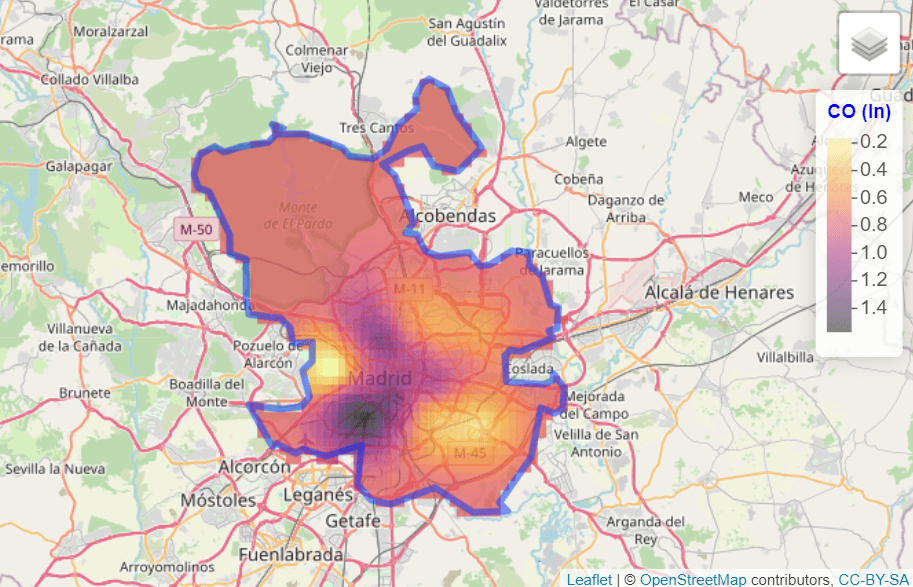
- Geostatistical data. For example, the level of log CO in Madrid:
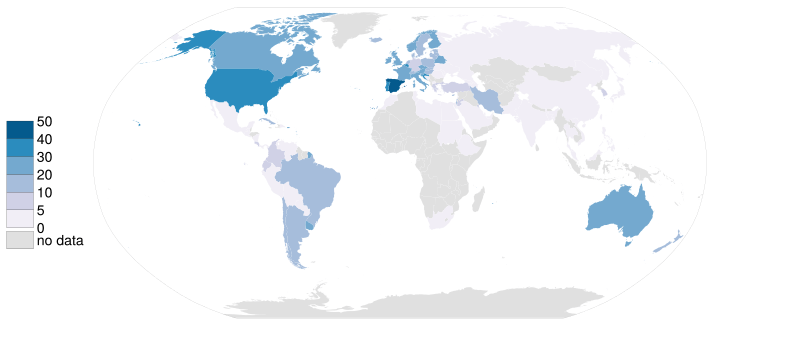
- Lattice data. For example, organ donor rate by country.
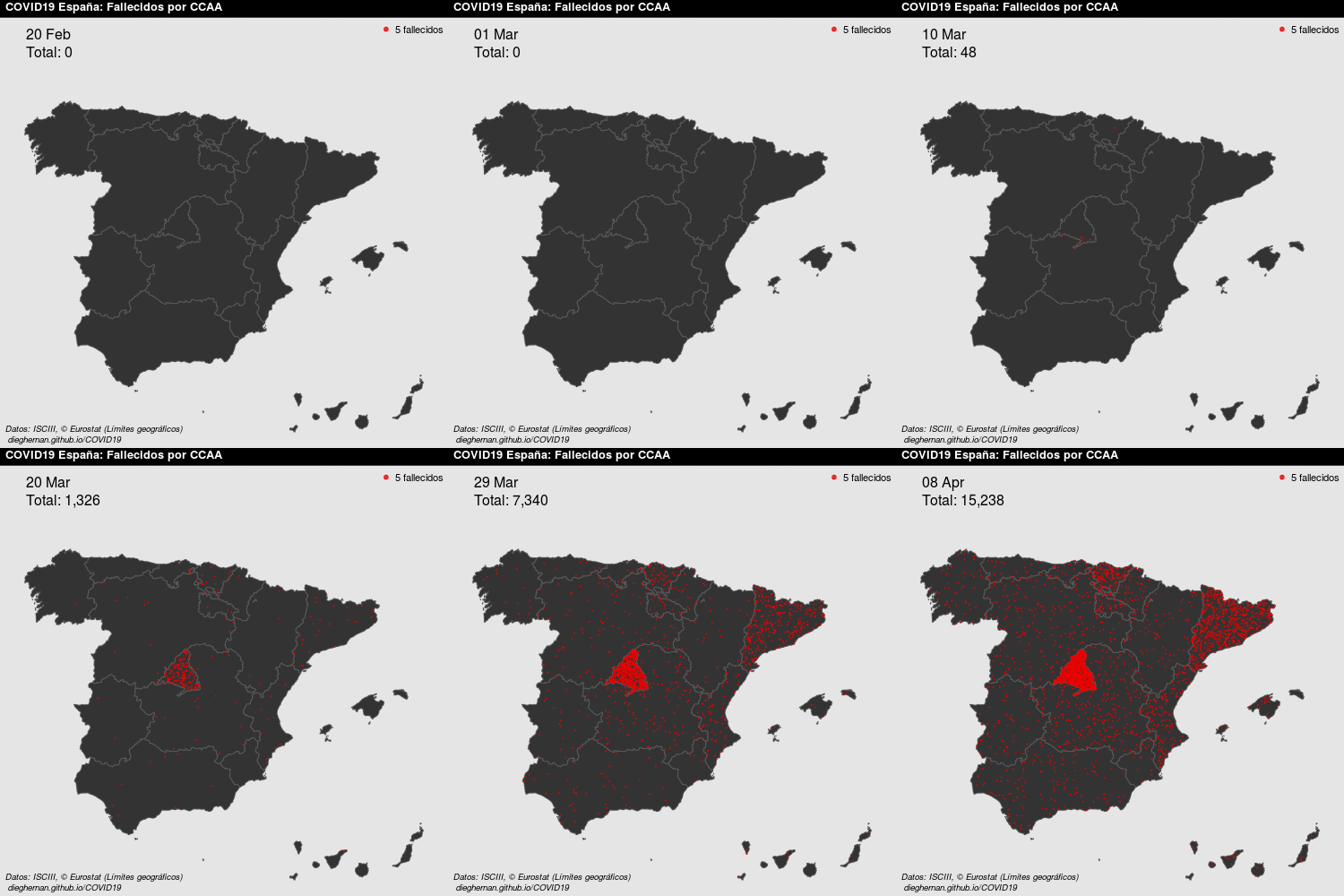
- Point patterns. For example, COVID deaths per day in Spain.
See Montero et al. (2015) for details. This article focuses on geostatistical data.
Requirements for geostatistical analysis in R
We use the following R packages throughout this article:
library(climaemet) # Meteorological data
library(mapSpain) # Base maps of Spain
library(classInt) # Classification
library(terra) # Raster handling
library(sf) # Spatial shape handling
library(gstat) # Spatial interpolation
library(geoR) # Spatial analysis
library(tidyverse) # Collection of R packages designed for data science
library(tidyterra) # Tidyverse methods for the terra package
Where can we find geostatistical data?
We model air temperature in Spain on 8 January 2021.
We retrieve daily climatology values with climaemet (>= 1.0.0) (Pizarro et al. 2021). The package provides access to data from the Spanish Meteorological Agency (AEMET) through the AEMET API and is available on CRAN:
# Install climaemet.
install.packages("climaemet")
API key
To download data from AEMET, you need a free API key.
What is the structure of geostatistical data?
Geostatistical data arise when the domain under study is a fixed set \(D\) that is continuous. That is, (i) \(Z(s)\) can be observed at any point of the domain (continuous) and (ii) the points in \(D\) are non-stochastic (fixed, \(D\) is the same for all realizations of the spatial random function).
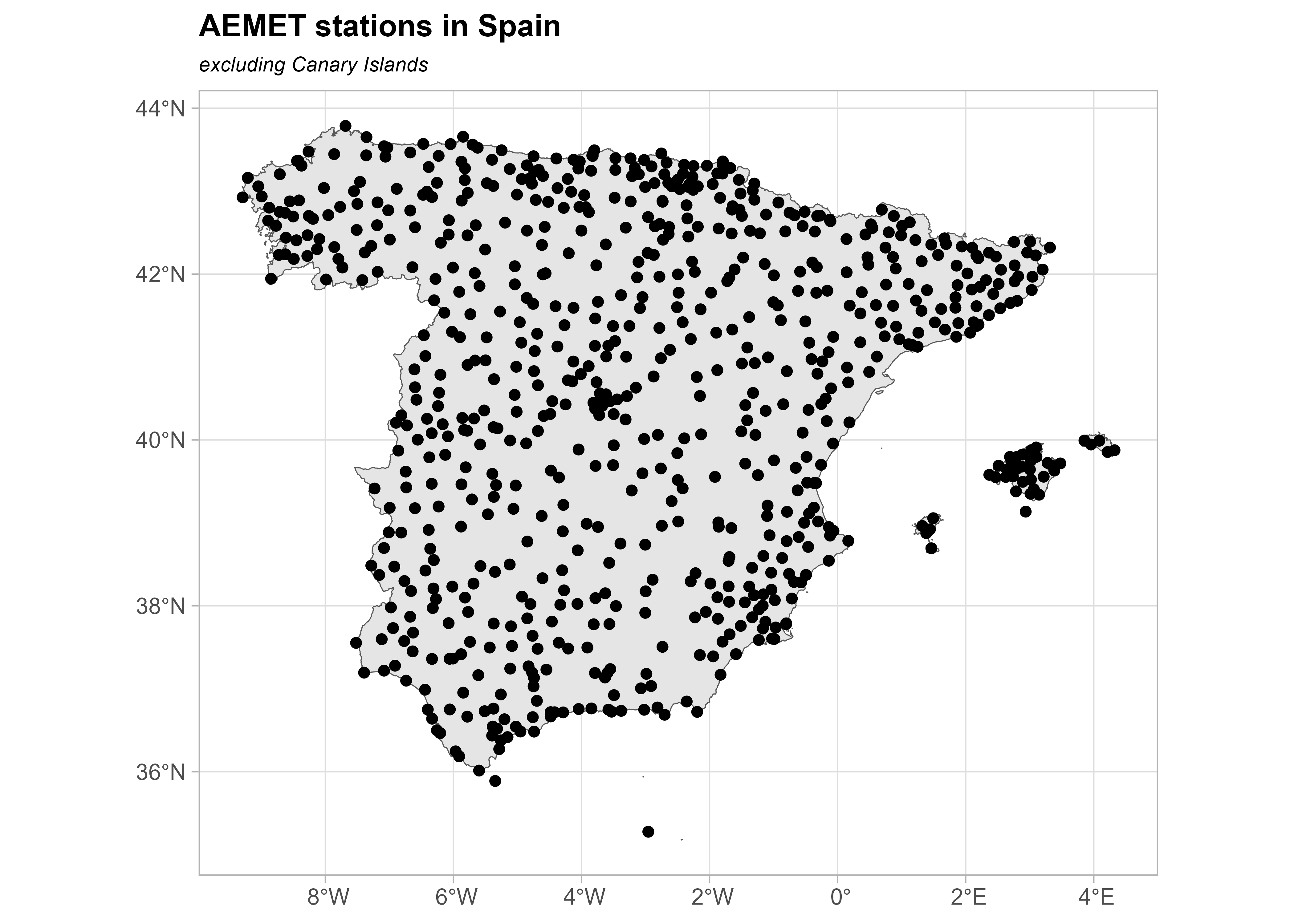
First, examine the weather-station metadata. We are particularly interested in the latitude and longitude columns.
stations <- aemet_stations()

# Inspect the data.
stations |>
  dplyr::select(name = nombre, latitude = latitud, longitude = longitud) |>
  head() |>
knitr::kable(caption = "Preview of AEMET stations")| name | latitude | longitude |
|---|---|---|
| ESCORCA, LLUC | 39.82333 | 2.885833 |
| SÓLLER, PUERTO | 39.79556 | 2.691389 |
| BANYALBUFAR | 39.68917 | 2.512778 |
| ANDRATX - SANT ELM | 39.57944 | 2.368889 |
| CALVIÀ, ES CAPDELLÀ | 39.55139 | 2.466389 |
| PALMA, PUERTO | 39.55417 | 2.625278 |
Next, retrieve the daily values for 8 January 2021:
“2021-01-08”
# Select data.
date_select <- "2021-01-08"

clim_data <- aemet_daily_clim(
  start = date_select,
  end = date_select,
  return_sf = TRUE
)
Next, inspect the available variables. We use minimum daily temperature, stored in tmin, although the API provides other measurements:
names(clim_data)
#>  [1] "fecha"       "indicativo"  "nombre"      "provincia"   "altitud"
#>  [6] "tmed"        "prec"        "tmin"        "horatmin"    "tmax"
#> [11] "horatmax"    "hrMedia"     "hrMax"       "horaHrMax"   "hrMin"
#> [16] "horaHrMin"   "dir"         "velmedia"    "racha"       "horaracha"
#> [21] "presMax"     "horaPresMax" "presMin"     "horaPresMin" "sol"
#> [26] "geometry"
Select the variable of interest for each station. For simplicity, exclude the Canary Islands:
clim_data_clean <- clim_data |>
  # Exclude Canary Islands from analysis.
  filter(str_detect(provincia, "PALMAS|TENERIFE", negate = TRUE)) |>
  dplyr::select(fecha, tmin) |>
  # Exclude NAs.
  filter(!is.na(tmin))

# Plot with outline of Spain.
esp_sf <- esp_get_ccaa(epsg = 4326) |>
  # Exclude Canary Islands from analysis.
  filter(ine.ccaa.name != "Canarias") |>
  # Group the whole country.
  st_union()

ggplot(esp_sf) +
  geom_sf() +
  geom_sf(data = clim_data_clean) +
  theme_light() +
  labs(
    title = "AEMET stations in Spain",
    subtitle = "excluding Canary Islands"
  ) +
  theme(
    plot.title = element_text(
      size = 12,
      face = "bold"
    ),
    plot.subtitle = element_text(
      size = 8,
      face = "italic"
    )
  )
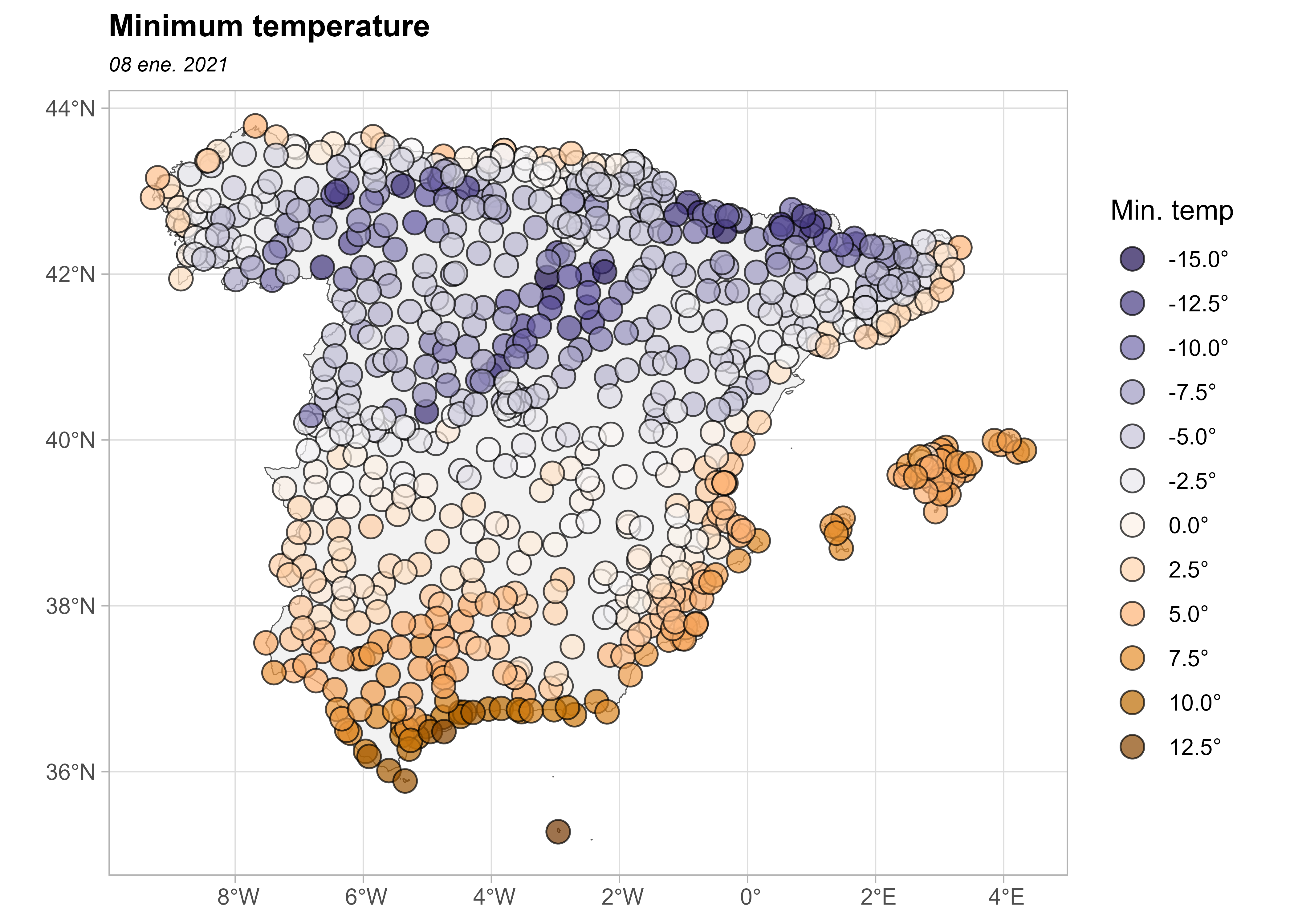
Plot the values as a choropleth map:
# Use common breaks and palette throughout the article.
br_paper <- c(-Inf, seq(-20, 20, 2.5), Inf)
pal_paper <- hcl.colors(15, "PuOr", rev = TRUE)

ggplot(clim_data_clean) +
  geom_sf(data = esp_sf, fill = "grey95") +
  geom_sf(aes(fill = tmin), shape = 21, size = 4, alpha = 0.7) +
  labs(fill = "Min. temp") +
  scale_fill_gradientn(
    colours = pal_paper,
    breaks = br_paper,
    labels = scales::label_number(suffix = "°"),
    guide = "legend"
  ) +
  theme_light() +
  labs(
    title = "Minimum temperature",
    subtitle = format(as.Date(date_select), "%d %b %Y")
  ) +
  theme(
    plot.title = element_text(
      size = 12,
      face = "bold"
    ),
    plot.subtitle = element_text(
      size = 8,
      face = "italic"
    )
  )
Are the observations independent or do they exhibit spatial dependence?
The First Law of Geography states that everything is related to everything else, but near things are more related than distant things (Tobler 1969). This law is the basis of the fundamental concepts of spatial dependence and spatial autocorrelation.
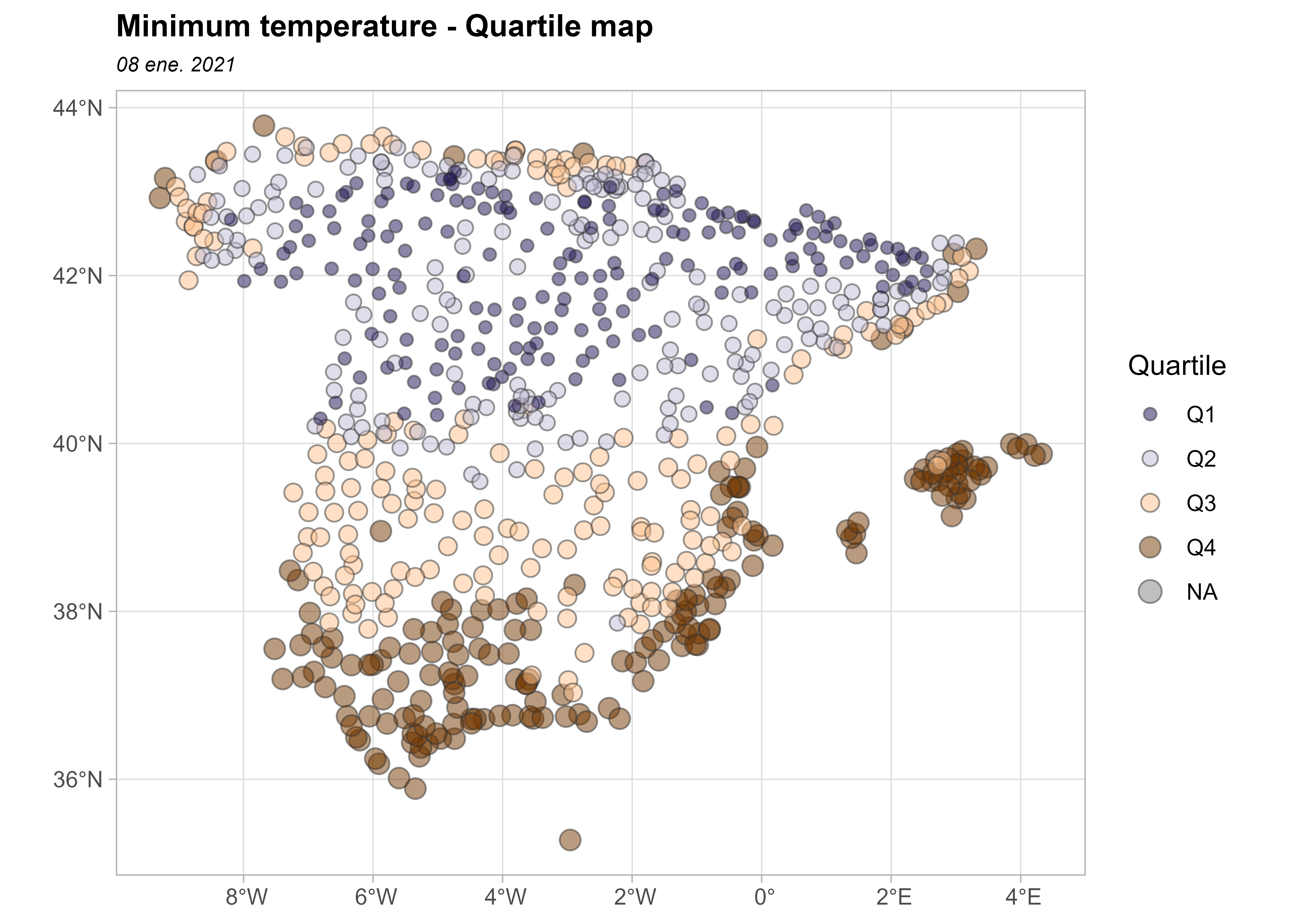
The data exhibit positive spatial dependence: high temperatures cluster in southern Spain, while low temperatures cluster in northern Spain.
| min | max | median | sd | n | q25 | q75 |
|---|---|---|---|---|---|---|
| -15.1 | 13.6 | -1.6 | 5.616639 | 743 | -5.3 | 2.85 |
The next plot divides minimum temperature into quartiles to show its spatial distribution.
bubble <- clim_data_clean |>
  arrange(desc(tmin))

# Create quartiles.
cuart <- classIntervals(bubble$tmin, n = 4)

bubble$quart <- cut(
  bubble$tmin,
  breaks = cuart$brks,
  labels = paste0("Q", seq(1:4))
)

ggplot(bubble) +
  geom_sf(
    aes(size = quart, fill = quart),
    colour = "grey20",
    alpha = 0.5,
    shape = 21
  ) +
  scale_size_manual(values = c(2, 2.5, 3, 3.5)) +
  scale_fill_manual(values = hcl.colors(4, "PuOr", rev = TRUE)) +
  theme_light() +
  labs(
    title = "Minimum temperature - Quartile map",
    subtitle = format(as.Date(date_select), "%d %b %Y"),
    fill = "Quartile",
    size = "Quartile"
  ) +
  theme(
    plot.title = element_text(size = 12, face = "bold"),
    plot.subtitle = element_text(size = 8, face = "italic")
  )
Prepare the data as a spatial object
An important consideration in any spatial analysis or visualization is the coordinate reference system (CRS). In this exercise, we choose to project our objects to ETRS89 / UTM zone 30N EPSG:25830, which provides projected x and y values in meters and maximizes the accuracy for Spain.
clim_data_utm <- st_transform(clim_data_clean, 25830)

esp_sf_utm <- st_transform(esp_sf, 25830)
Create a grid for spatial prediction
Prediction at unobserved locations requires a grid and an interpolation method. We use the terra package to work with spatial grids (SpatRaster objects). Hijmans and Ghosh (2023) provides a detailed explanation of spatial interpolation using the terra and gstat packages.
This grid contains equally spaced cells across the bounding box of Spain. Most cells do not contain weather stations and therefore have no observations. We use cells with observations to interpolate values for the remaining cells.
# Create a 5 by 5 km grid (25 square km).
# The resolution is based on the projection unit, in this case meters.
grd <- rast(vect(esp_sf_utm), res = c(5000, 5000))

cellSize(grd)
#> class       : SpatRaster
#> size        : 193, 228, 1  (nrow, ncol, nlyr)
#> resolution  : 5000, 5000  (x, y)
#> extent      : -13882.95, 1126117, 3892802, 4857802  (xmin, xmax, ymin, ymax)
#> coord. ref. : ETRS89 / UTM zone 30N (EPSG:25830)
#> source(s)   : memory
#> name        :     area
#> min value   : 24785392
#> max value   : 25019998
Some additional steps are needed to prepare the data for spatial interpolation.
# Some points are duplicated, so remove them.

clim_data_clean_nodup <- clim_data_utm |>
  distinct(geometry, .keep_all = TRUE)

nrow(clim_data_utm)
#> [1] 743

nrow(clim_data_clean_nodup)
#> [1] 738

clim_data_clean_nodup
#> Simple feature collection with 738 features and 2 fields
#> Geometry type: POINT
#> Dimension:     XY
#> Bounding box:  xmin: -13501.2 ymin: 3903695 xmax: 1126597 ymax: 4858794
#> Projected CRS: ETRS89 / UTM zone 30N
#> # A tibble: 738 × 3
#>    fecha       tmin           geometry
#>    <date>     <dbl>        <POINT [m]>
#>  1 2021-01-08   4.2 (672170.6 4229216)
#>  2 2021-01-08   0.4 (974469.6 4626714)
#>  3 2021-01-08   5.9 (342907.5 4117910)
#>  4 2021-01-08  -7.6 (246984.3 4576961)
#>  5 2021-01-08   0.1 (740805.4 4456820)
#>  6 2021-01-08  -9.7 (433670.8 4553921)
#>  7 2021-01-08   1.3 (691017.1 4333929)
#>  8 2021-01-08   0.6 (179243.6 4231942)
#>  9 2021-01-08  -4.9 (227110.4 4495959)
#> 10 2021-01-08   3.8   (714492 4319880)
#> # ℹ 728 more rows
Analyze the structure of spatial dependence
Exploratory spatial data analysis (ESDA)
Exploratory data analysis (EDA) is an important first step in data modeling. Similarly, exploratory spatial data analysis (ESDA) is the first step in this spatial analysis. What do the data reveal about the relationship between the X and Y coordinates and tmin?
To answer this question, summarize the spatial object and examine the number of observations, coordinates, distances and values.
clim_data_clean_nodup_geor <- clim_data_clean_nodup |>
  st_coordinates() |>
  as.data.frame() |>
  bind_cols(st_drop_geometry(clim_data_clean_nodup)) |>
  as.geodata(coords.col = 1:2, data.col = "tmin")

summary(clim_data_clean_nodup_geor)
#> Number of data points: 738
#>
#> Coordinates summary
#>             X       Y
#> min  -13501.2 3903695
#> max 1126597.2 4858794
#>
#> Distance summary
#>          min          max
#> 2.252607e+01 1.187437e+06
#>
#> Data summary
#>      Min.   1st Qu.    Median      Mean   3rd Qu.      Max.
#> -15.10000  -5.30000  -1.60000  -1.38523   2.90000  13.60000
Next, generate several exploratory geostatistical plots: a quartile map, plots of tmin against the X and Y coordinates and a histogram of tmin.
plot(clim_data_clean_nodup_geor)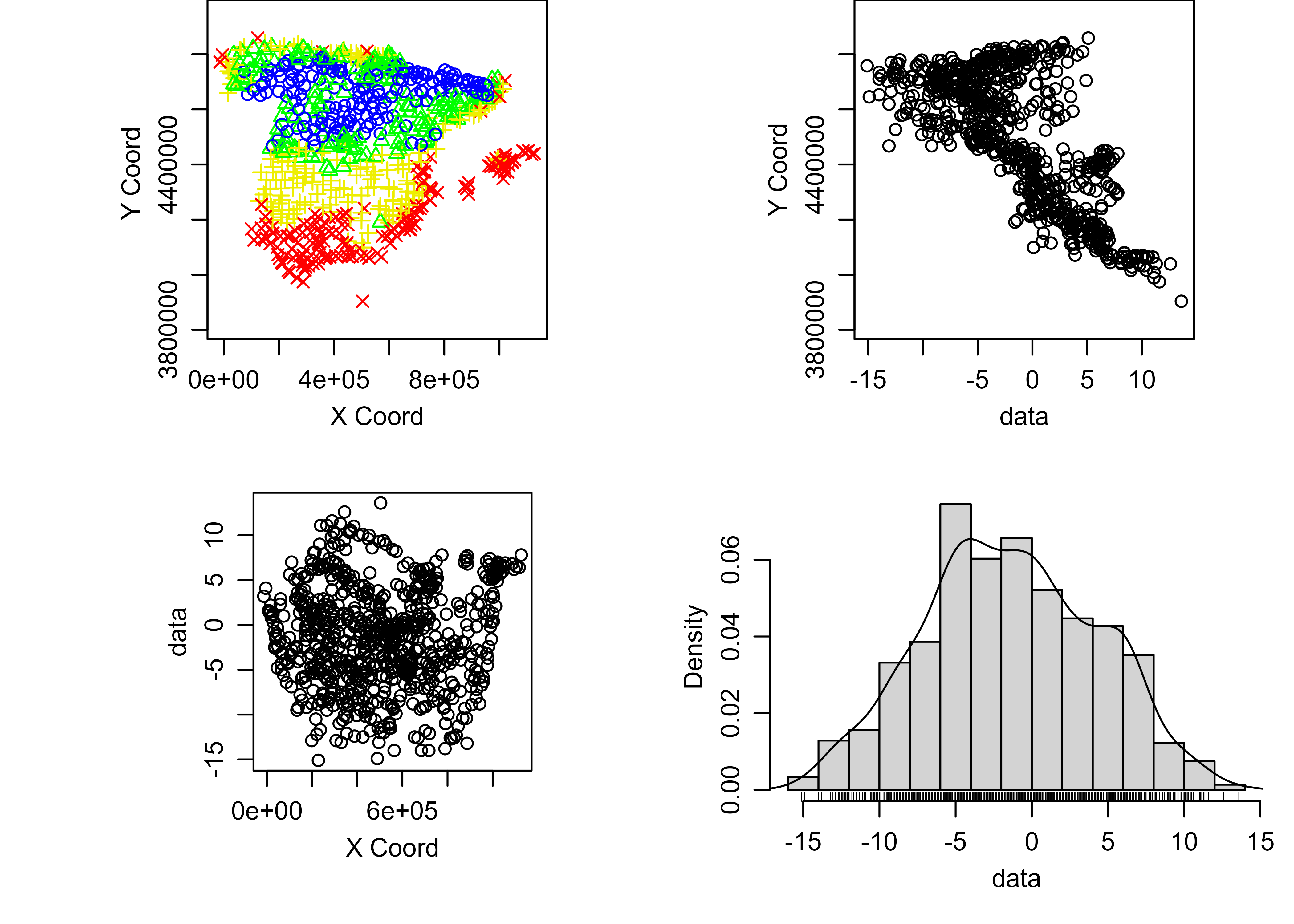
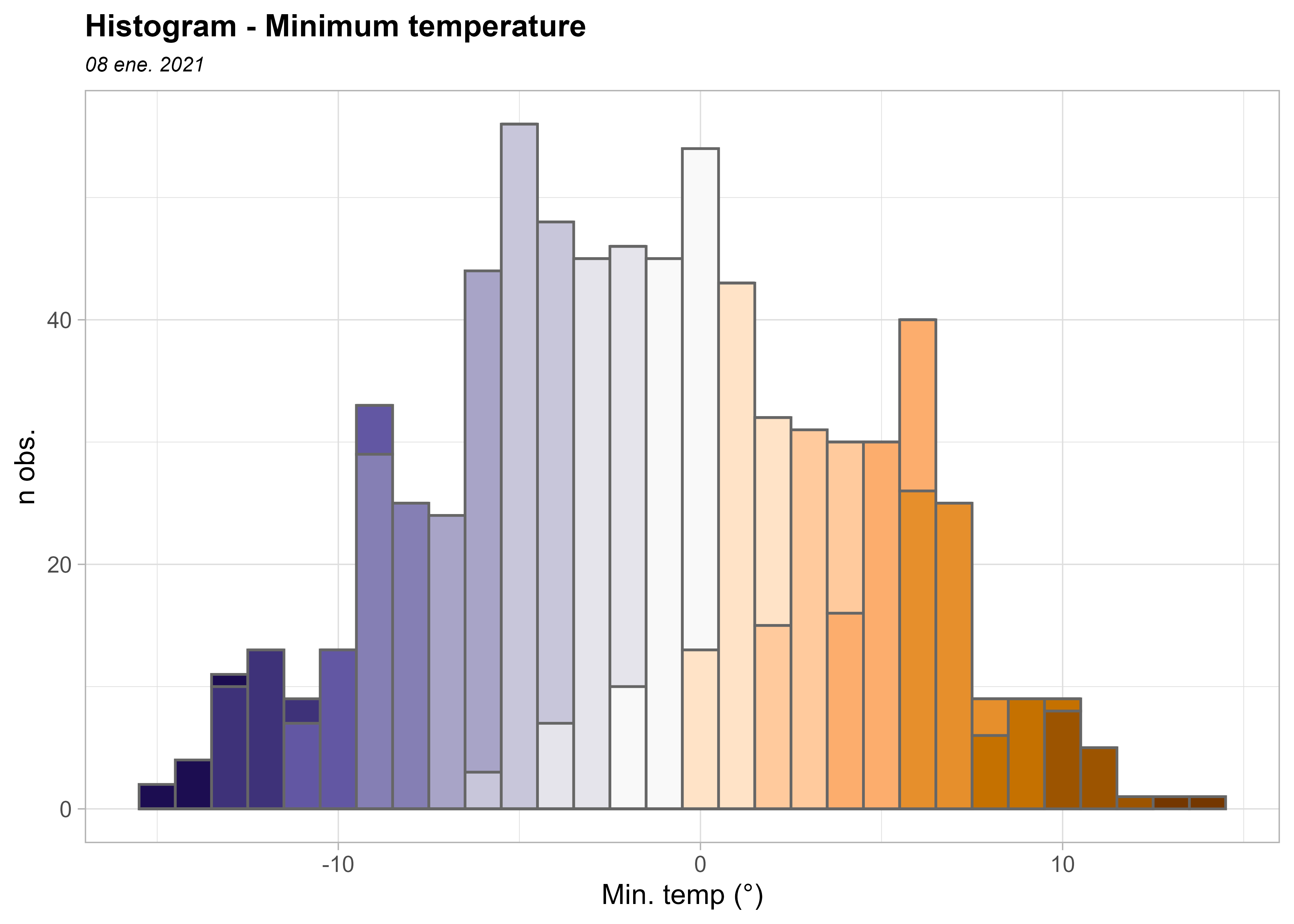
The histogram suggests that the data are approximately Gaussian. Kriging provides the best linear unbiased predictor BLUP.
ggplot(clim_data_clean_nodup, aes(x = tmin)) +
  geom_histogram(
    aes(fill = cut(tmin, 15)),
    color = "grey40",
    binwidth = 1,
    show.legend = FALSE
  ) +
  scale_fill_manual(values = pal_paper) +
  labs(y = "n obs.", x = "Min. temp (°)") +
  theme_light() +
  labs(
    title = "Histogram - Minimum temperature",
    subtitle = format(as.Date(date_select), "%d %b %Y")
  ) +
  theme(
    plot.title = element_text(size = 12, face = "bold"),
    plot.subtitle = element_text(size = 8, face = "italic")
  )
The semivariogram
The semivariogram is central to geostatistical prediction. Following Montero et al. (2015), it describes the spatial dependence or correlation in the observed realization. This structural analysis is essential for kriging because prediction depends on an adequate model of spatial dependence.
Covariance functions and semivariograms must satisfy specific theoretical requirements. Estimates derived from a single observed realization may not satisfy them, so a valid theoretical model must be fitted to the empirical semivariogram.
There are several R packages for geostatistical analysis, including two widely used options: geoR (Ribeiro Jr and Diggle 2001) and gstat (Pebesma 2004; Gräler et al. 2016).
The semivariogram is generally nondecreasing, meaning that variability increases with distance.
First, generate an omnidirectional empirical semivariogram. Then fit a theoretical model to it.
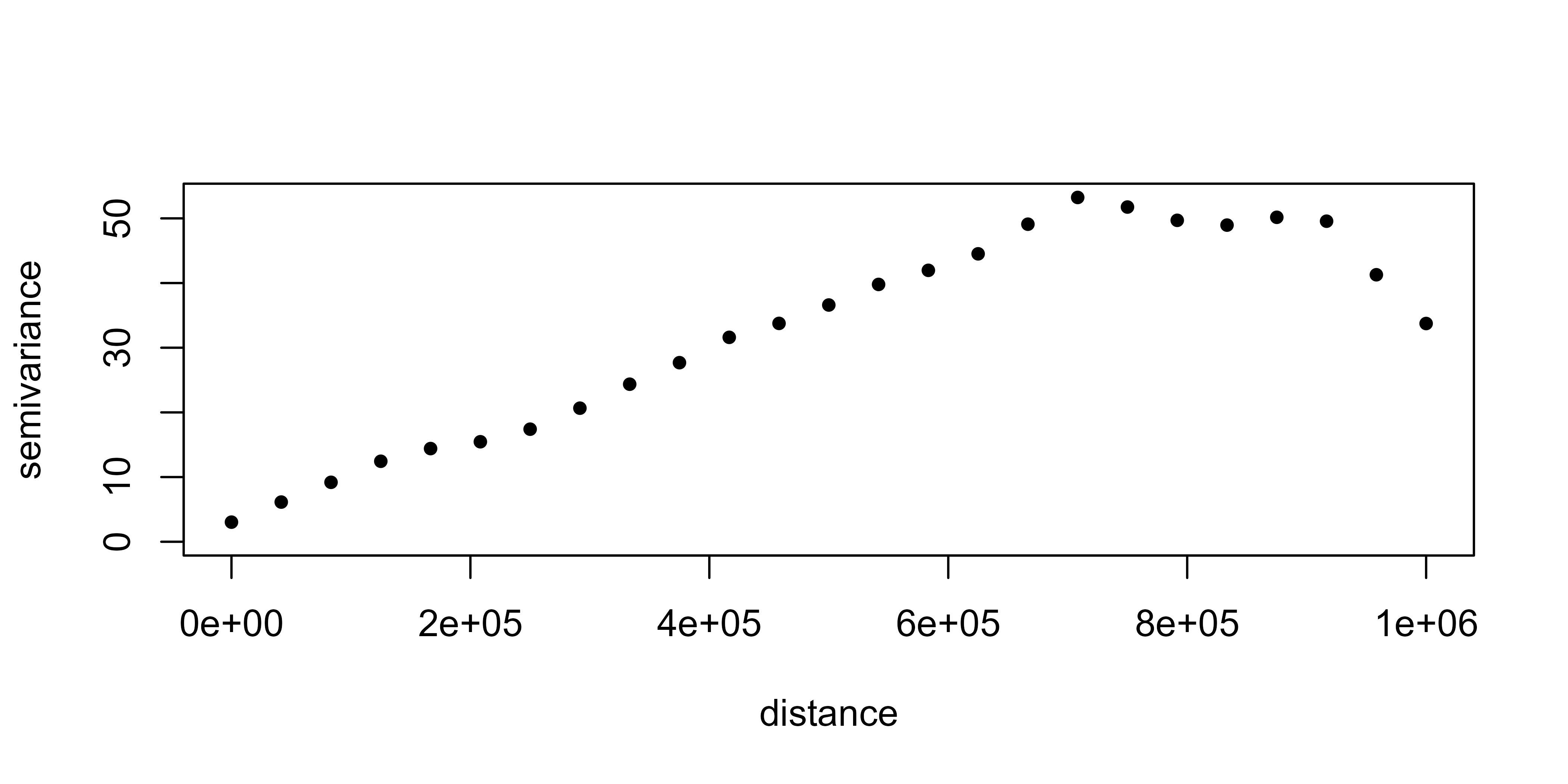
geoR::eyefit() interactively fits semivariogram parameters by eye. Other methods include ordinary least squares (OLS), weighted least squares (WLS), maximum likelihood (ML) and restricted maximum likelihood (REML).
Run this interactive function locally.
eyefit(vario_geor)geoR::eyefit() illustrates that each semivariogram model has parameters that must be fitted.
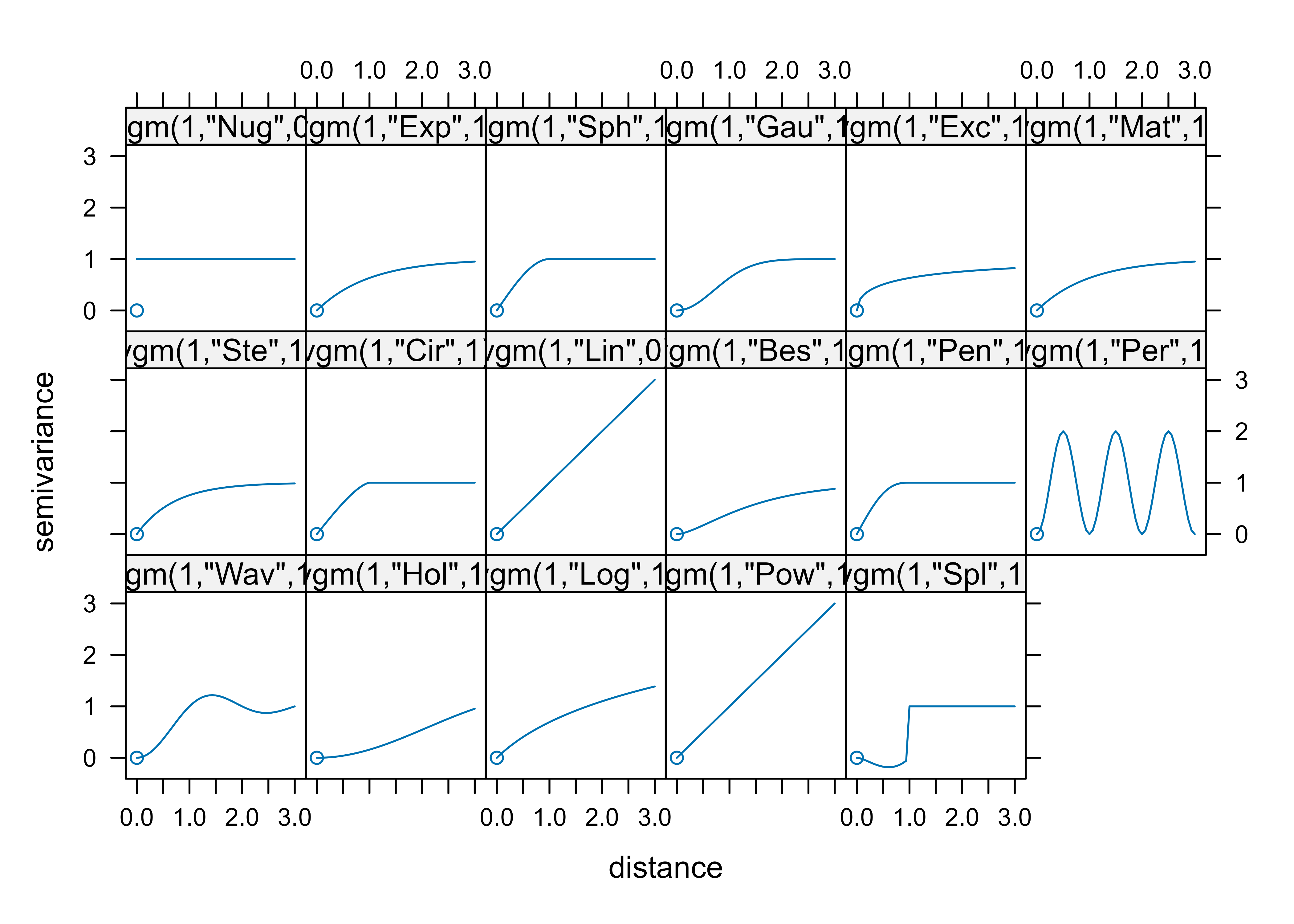
The main types of semivariograms are:
- Spherical.
- Exponential.
- Gaussian.
- Hole effect.
- K-Bessel.
- J-Bessel.
- Stable.
- Matérn.
- Circular.
- Nugget.
A graphical summary of the most common spatial semivariogram models can be found here:
Regarding the parameters, the main ones are:
- Sill: The a priori variance of the random function.
- Range: The distance at which the sill is reached, which defines the threshold of spatial dependence.
- Nugget: The value at which the semivariogram intercepts the y-value. Theoretically, at zero separation distance, the semivariogram value is 0. The nugget effect can be attributed to measurement errors or spatial sources of variation at distances smaller than the sampling interval or both.
For a detailed study of the semivariogram function, see Montero et al. (2015).
Plot the empirical semivariogram with gstat::variogram() in four directions: 0°, 45°, 90° and 135°.
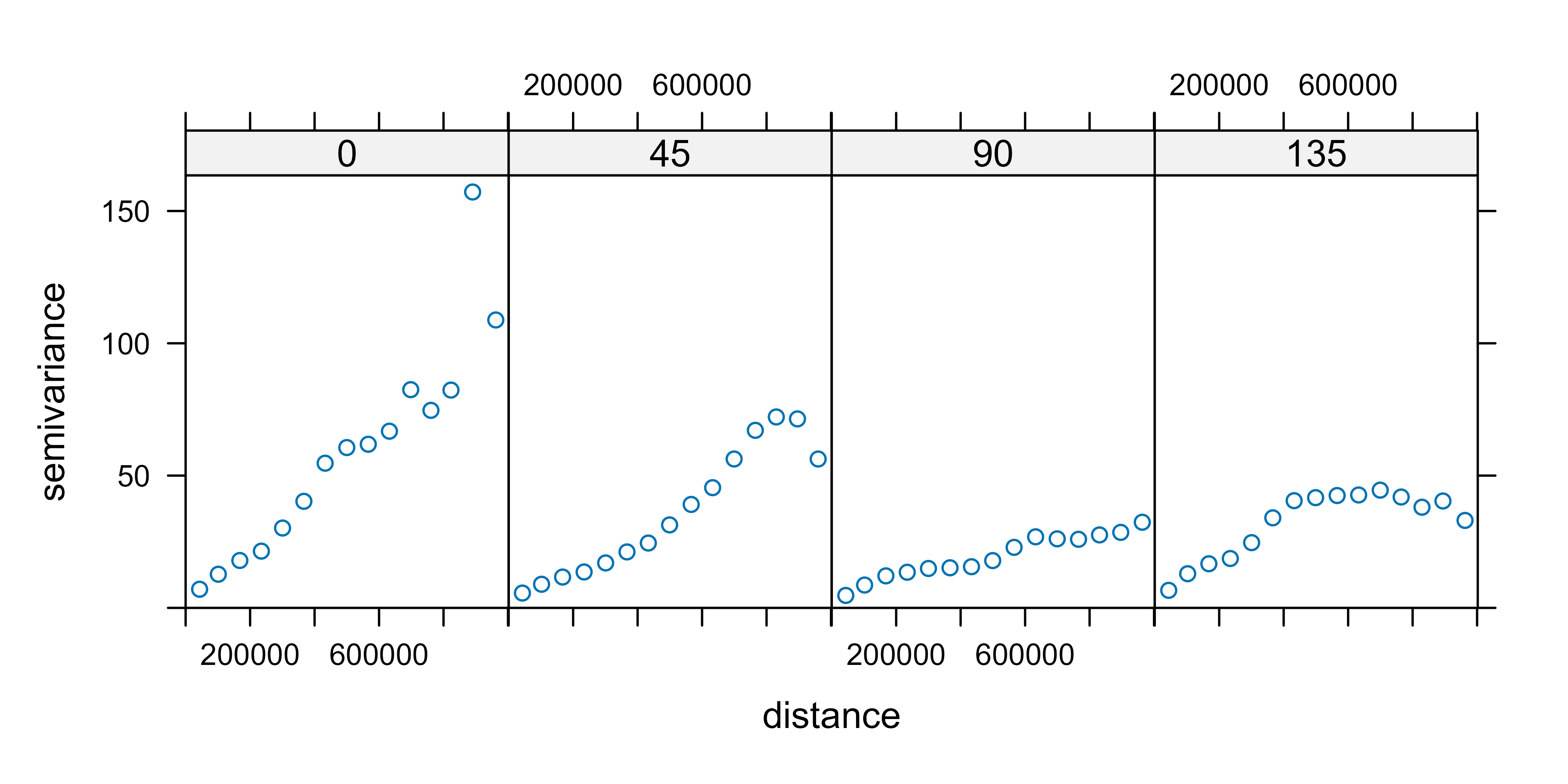
All four semivariograms exhibit spatial dependence. We use the 90° directional semivariogram.
vgm_dir_selected <- variogram(
  tmin ~ 1,
  clim_data_clean_nodup,
  cutoff = 1000000,
  alpha = 90
)
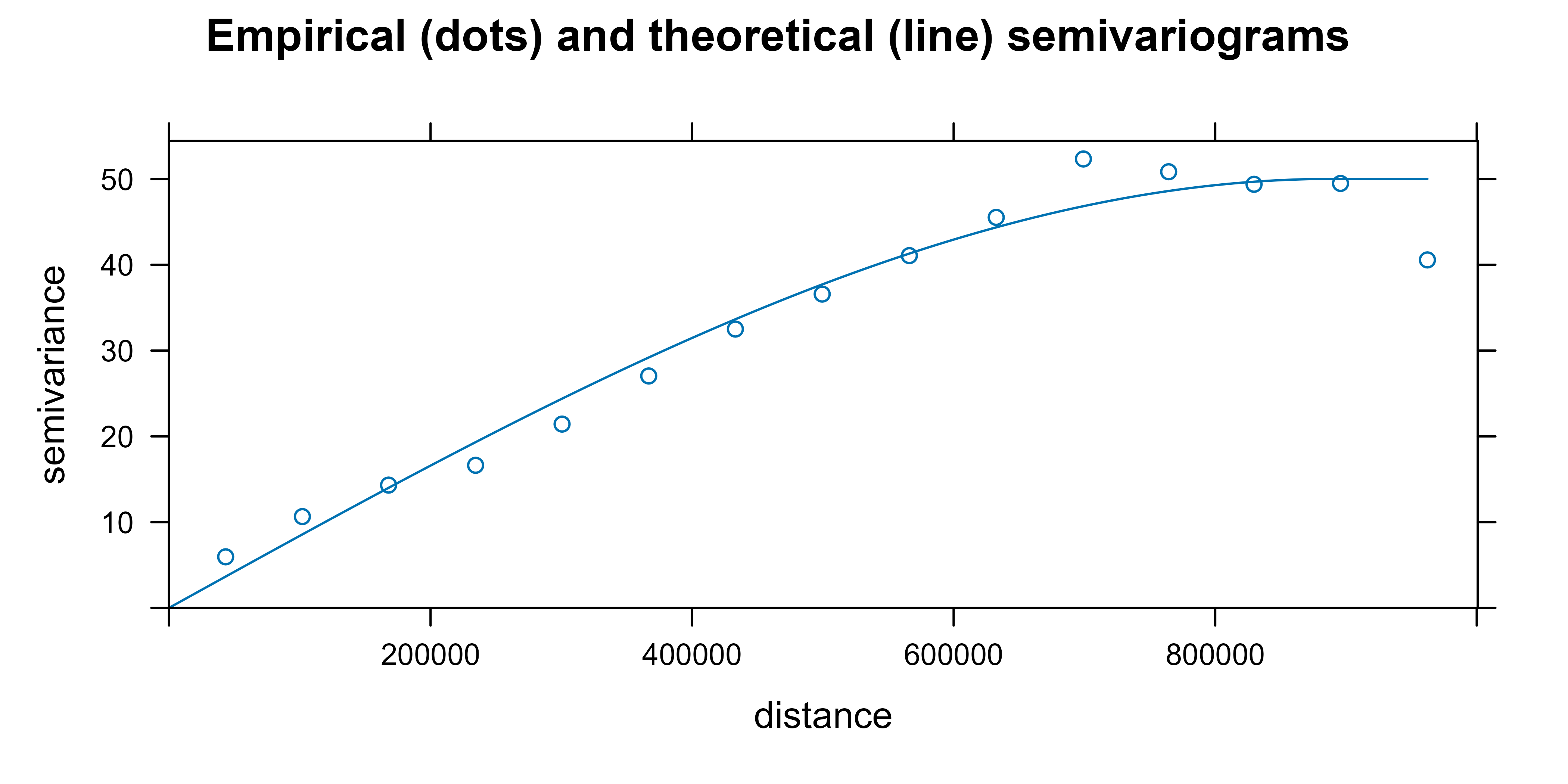
Fit a theoretical semivariogram for use in the kriging equations. The fit_var object contains the estimated parameters.
fit_var <- fit.variogram(vgm_dir_selected, model = vgm(model = "Sph"))

fit_var
#>   model    psill    range
#> 1   Sph 50.01736 889200.2
Finally, plot the empirical and theoretical semivariograms together.
plot(
  vgm_dir_selected,
  fit_var,
  main = "Empirical (dots) and theoretical (line) semivariograms "
)
Perform ordinary kriging
Once a theoretical semivariogram has been selected, spatial prediction can begin. This method is called kriging in honor of South African mining engineer Daniel Gerhardus Krige.
According to Montero et al. (2015), kriging aims to predict the value of a random function, \(Z(s)\), at one or more unobserved points (or blocks) from a collection of data observed at \(n\) points (or blocks in the case of block prediction) of a domain \(D\) and provides the best linear unbiased predictor (BLUP) of the regionalized variable at those unobserved points or blocks.
There are different kinds of kriging depending on the characteristics of the spatial process: simple, ordinary or universal kriging (external drift kriging), kriging in a local neighborhood, point kriging, block kriging and conditional simulation.
This article uses ordinary kriging, the most widely used kriging method. According to Wackernagel (1995), it estimates a value at a point of a region for which a variogram is known, using data in the neighborhood of the estimation location.
In this study, we perform ordinary kriging (OK) following Hijmans and Ghosh (2023).
# Pass the input as a data frame.
clim_data_clean_nodup_df <- vect(clim_data_clean_nodup) |>
  as_tibble(geom = "XY")

clim_data_clean_nodup_df
#> # A tibble: 738 × 4
#>    fecha       tmin       x        y
#>    <date>     <dbl>   <dbl>    <dbl>
#>  1 2021-01-08   4.2 672171. 4229216.
#>  2 2021-01-08   0.4 974470. 4626714.
#>  3 2021-01-08   5.9 342908. 4117910.
#>  4 2021-01-08  -7.6 246984. 4576961.
#>  5 2021-01-08   0.1 740805. 4456820.
#>  6 2021-01-08  -9.7 433671. 4553921.
#>  7 2021-01-08   1.3 691017. 4333929.
#>  8 2021-01-08   0.6 179244. 4231942.
#>  9 2021-01-08  -4.9 227110. 4495959.
#> 10 2021-01-08   3.8 714492. 4319880.
#> # ℹ 728 more rows

k <- gstat(
  formula = tmin ~ 1,
  locations = ~ x + y,
  data = clim_data_clean_nodup_df,
  model = fit_var
)

kriged <- interpolate(grd, k, debug.level = 0)
Plot the kriging prediction:
pred <- ggplot(esp_sf_utm) +
  geom_spatraster(data = kriged, aes(fill = var1.pred)) +
  geom_sf(colour = "black", fill = NA) +
  scale_fill_gradientn(
    colours = pal_paper,
    breaks = br_paper,
    labels = scales::label_number(suffix = "°"),
    guide = guide_legend(
      reverse = TRUE,
      title = "Min. temp\n(kriged)"
    )
  ) +
  theme_light() +
  labs(
    title = "Ordinary kriging - minimum temperature",
    subtitle = format(as.Date(date_select), "%d %b %Y")
  ) +
  theme(
    plot.title = element_text(size = 12, face = "bold"),
    plot.subtitle = element_text(size = 8, face = "italic"),
    panel.grid = element_blank(),
    panel.border = element_blank()
  )

pred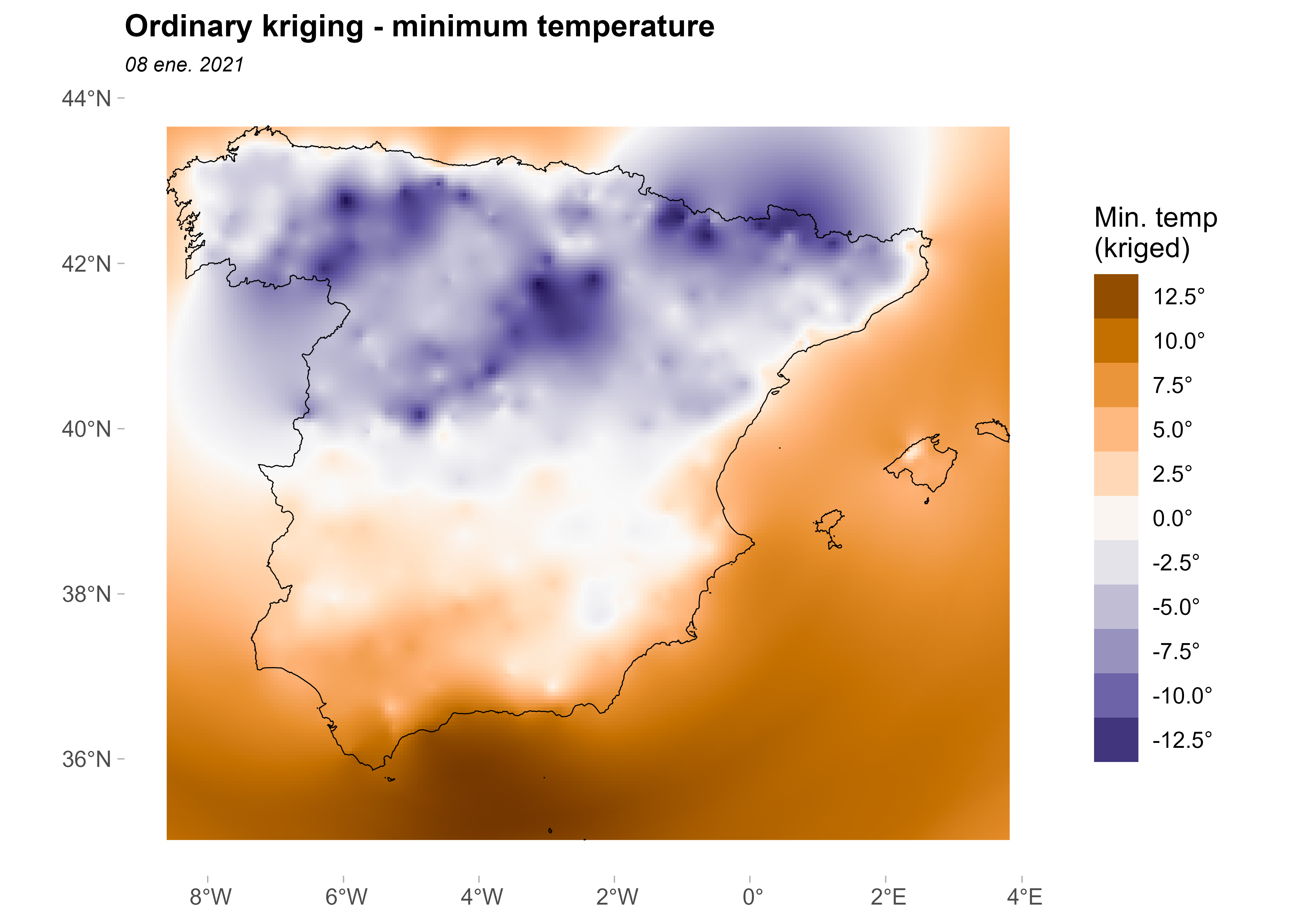
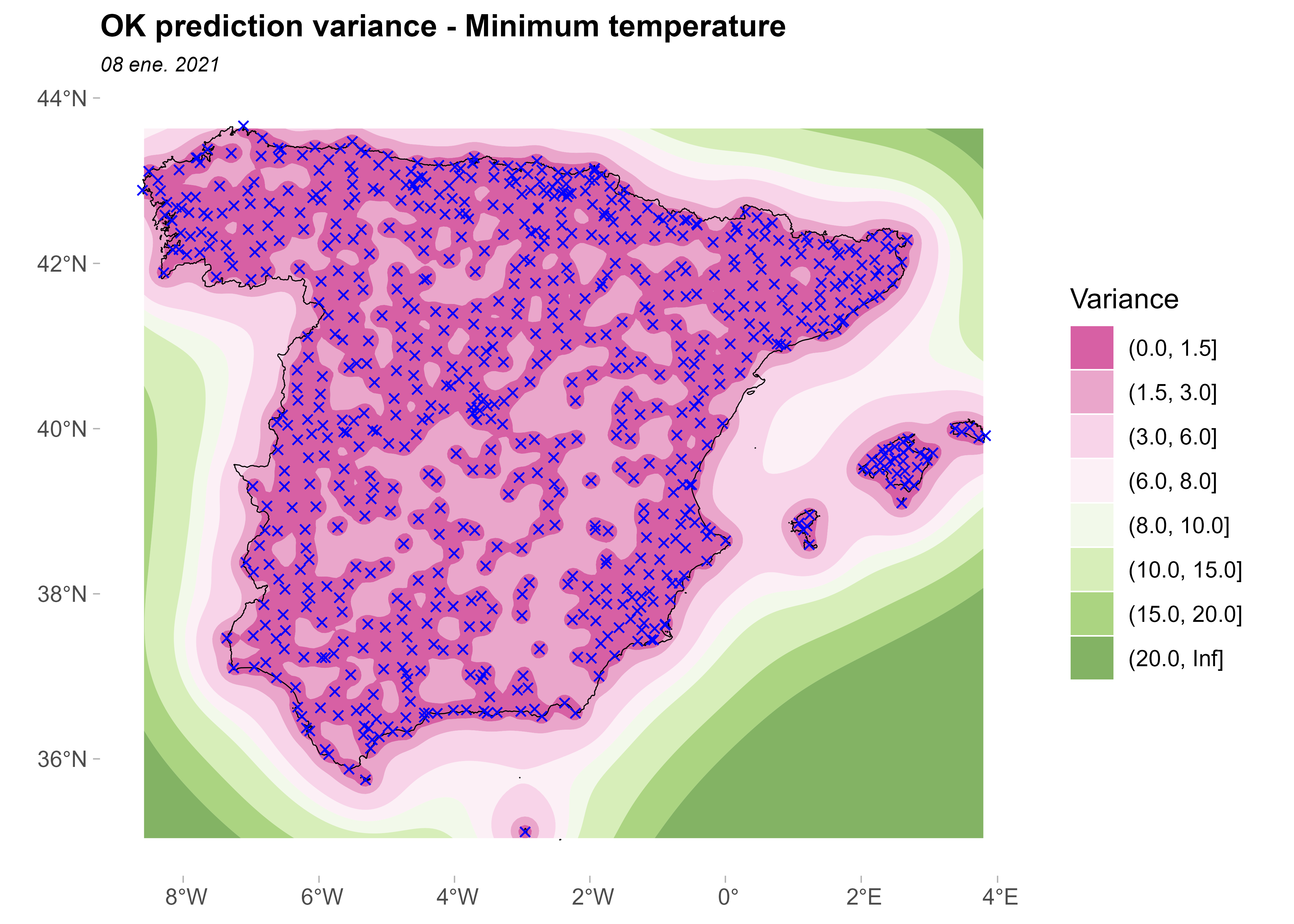
Plot the prediction variance:
ggplot(esp_sf_utm) +
  geom_spatraster_contour_filled(
    data = kriged,
    aes(z = var1.var),
    breaks = c(0, 1.5, 3, 6, 8, 10, 15, 20, Inf)
  ) +
  geom_sf(colour = "black", fill = NA) +
  geom_sf(data = clim_data_clean_nodup, colour = "blue", shape = 4) +
  scale_fill_whitebox_d(
    palette = "pi_y_g",
    alpha = 0.7,
    guide = guide_legend(title = "Variance")
  ) +
  theme_light() +
  labs(
    title = "OK prediction variance - Minimum temperature",
    subtitle = format(as.Date(date_select), "%d %b %Y")
  ) +
  theme(
    plot.title = element_text(size = 12, face = "bold"),
    plot.subtitle = element_text(size = 8, face = "italic"),
    panel.grid = element_blank(),
    panel.border = element_blank()
  )
Finally, plot the prediction and its variance together:
pred +
  geom_sf(data = clim_data_clean_nodup, colour = "darkred", shape = 20) +
  geom_spatraster_contour(
    data = kriged,
    aes(z = var1.var),
    breaks = c(0, 2.5, 5, 10, 15, 20)
  ) +
  labs(
    title = "OK: Prediction and variance prediction",
    caption = "Points: Climate stations.\nLines: Cluster of variances"
  )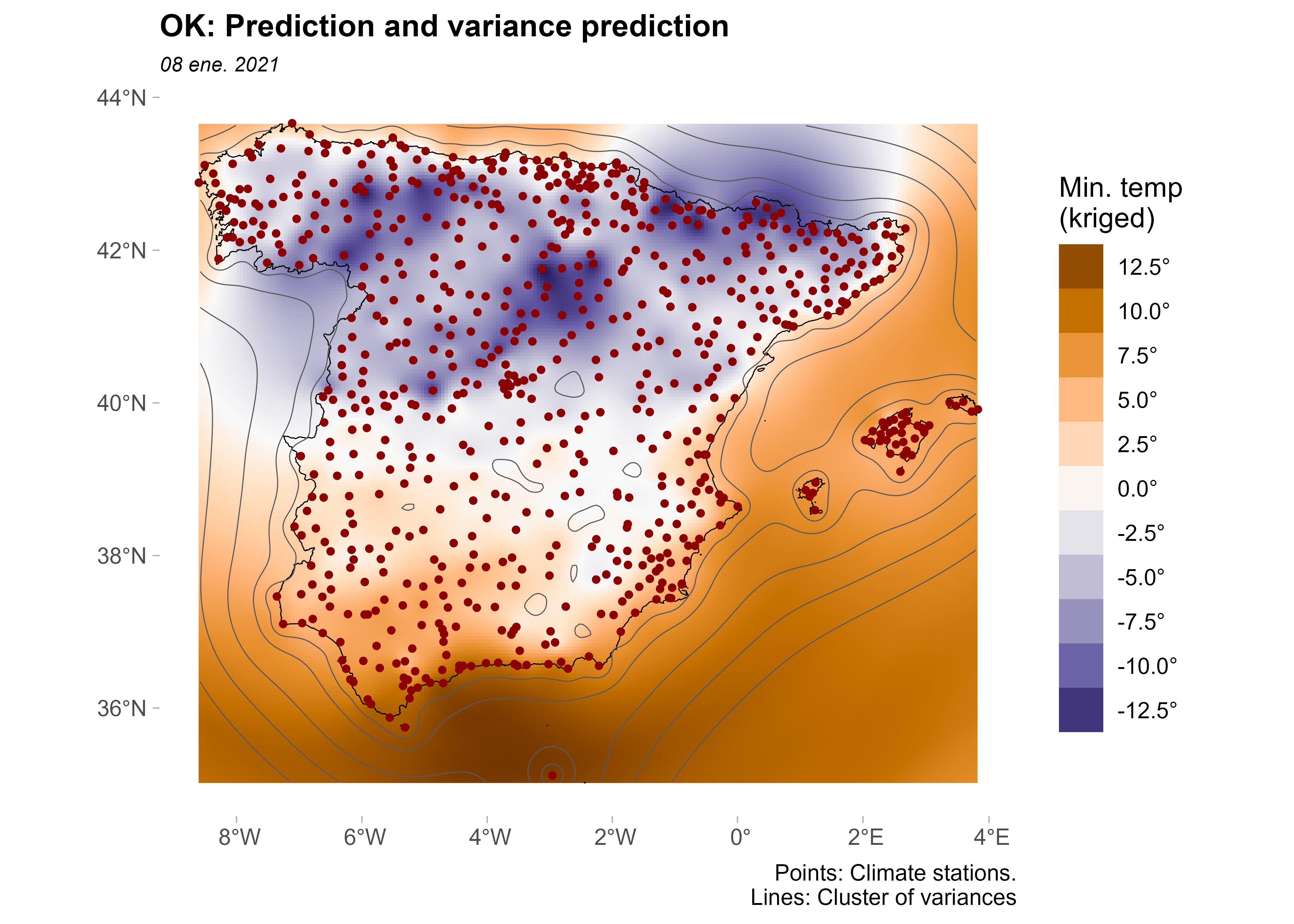
The prediction variance is minimal in areas near the observed points. In contrast, prediction variance is higher in areas where no monitoring stations are available.
Compare ordinary kriging with inverse distance weighting
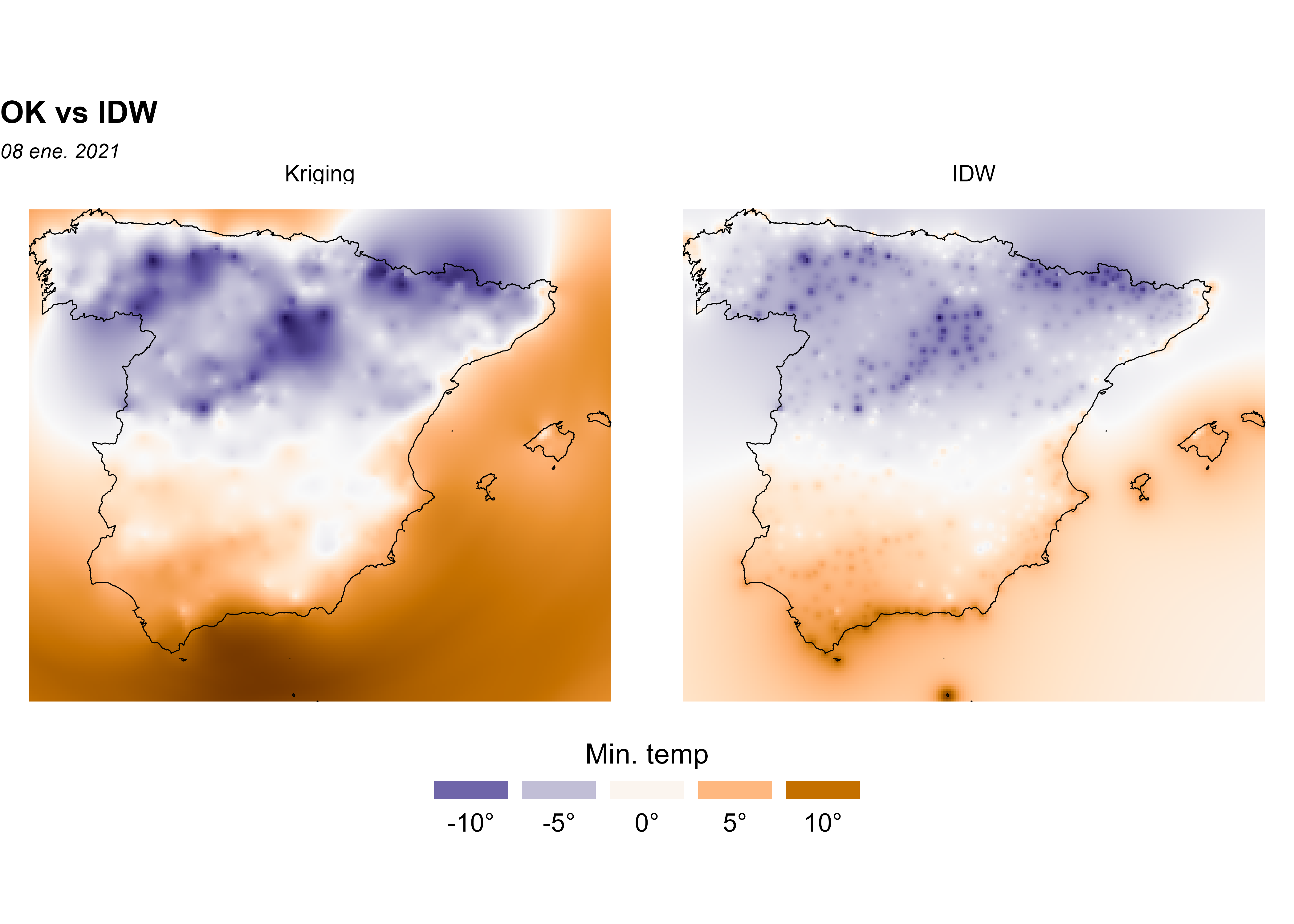
In this section, we compare ordinary kriging (OK) with inverse distance weighting (IDW), one of several approaches for spatial interpolation. We follow the approach in Hijmans and Ghosh (2023) and use terra in R.
IDW is a deterministic interpolation technique that creates surfaces from sample points using an inverse distance function of neighboring points. In contrast, stochastic interpolation techniques such as kriging use the statistical properties of the sample points (based on the variogram, which gives the spatial structure of the studied variable). Kriging also provides a prediction-error map.
gs <- gstat(
  formula = tmin ~ 1,
  locations = ~ x + y,
  data = clim_data_clean_nodup_df,
  set = list(idp = 2.0)
)

idw <- interpolate(grd, gs)
#> [inverse distance weighted interpolation]
#> [inverse distance weighted interpolation]

# Create a SpatRaster with two layers, one prediction each.

all_methods <- c(
  kriged |> select(Kriging = var1.pred),
  idw |> select(IDW = var1.pred)
)

# Plot and compare.
ggplot(esp_sf_utm) +
  geom_spatraster(data = all_methods) +
  facet_wrap(~lyr) +
  geom_sf(colour = "black", fill = NA) +
  scale_fill_gradientn(
    colours = pal_paper,
    n.breaks = 10,
    labels = scales::label_number(suffix = "°"),
    guide = guide_legend(
      title = "Min. temp",
      direction = "horizontal",
      keyheight = 0.5,
      keywidth = 2,
      title.position = "top",
      title.hjust = 0.5,
      label.hjust = 0.5,
      nrow = 1,
      byrow = TRUE,
      reverse = FALSE,
      label.position = "bottom"
    )
  ) +
  theme_void() +
  labs(
    title = "OK vs IDW",
    subtitle = format(as.Date(date_select), "%d %b %Y")
  ) +
  theme(
    panel.grid = element_blank(),
    panel.border = element_blank(),
    plot.title = element_text(size = 12, face = "bold"),
    plot.subtitle = element_text(size = 8, face = "italic"),
    legend.text = element_text(size = 10),
    legend.title = element_text(size = 11),
    legend.position = "bottom"
  )
Cross-validation
Compare OK and IDW with a cross-validation (CV), or leave-one-out, process. CV is the most widely used procedure to validate the semivariogram model selected for kriging interpolation.
## Cross-validation: OK
xv_ok <- krige.cv(tmin ~ 1, clim_data_clean_nodup, fit_var)

xv_ok |>
  st_drop_geometry() |>
  summarise(across(
    everything(),
    list(min = min, max = max),
    .names = "{.col}_{.fn}"
  )) |>
  pivot_longer(everything(), names_to = c("field", "stat"), names_sep = "_") |>
  pivot_wider(id_cols = stat, names_from = field)
#> # A tibble: 2 × 7
#>   stat  var1.pred var1.var observed residual zscore  fold
#>   <chr>     <dbl>    <dbl>    <dbl>    <dbl>  <dbl> <dbl>
#> 1 min       -12.9  0.00379    -15.1    -8.24  -8.55     1
#> 2 max        14.0 17.6         13.6     6.69   8.65   738
# Cross-validation: IDW
xv_idw <- krige.cv(tmin ~ 1, clim_data_clean_nodup)
xv_idw |>
st_drop_geometry() |>
summarise(across(
everything(),
list(min = min, max = max),
.names = "{.col}_{.fn}"
)) |>
pivot_longer(everything(), names_to = c("field", "stat"), names_sep = "_") |>
pivot_wider(id_cols = stat, names_from = field)
#> # A tibble: 2 × 7
#> stat var1.pred var1.var observed residual zscore fold
#> <chr> <dbl> <dbl> <dbl> <dbl> <dbl> <dbl>
#> 1 min -11.5 NA -15.1 -9.49 NA 1
#> 2 max 9.59 NA 13.6 10.8 NA 738Plot the leave-one-out cross-validation residuals. The residuals from OK are smaller than those from IDW.
# Create a unique scale.

allvalues <- values(all_methods, na.rm = TRUE, mat = FALSE)

# Prepare the final data.
cross_val <- xv_ok |>
  mutate(method = "OK") |>
  bind_rows(
    xv_idw |>
      mutate(method = "IDW")
  ) |>
  select(method, residual) |>
  mutate(method = as_factor(method), cat = cut_number(residual, 5))

ggplot(cross_val) +
  geom_sf(data = esp_sf_utm, fill = "grey90") +
  geom_sf(aes(fill = cat, size = cat), shape = 21) +
  facet_wrap(~method) +
  scale_size_manual(values = c(1.5, 1, 0.5, 1, 1.5)) +
  scale_fill_whitebox_d(palette = "pi_y_g", alpha = 0.7) +
  labs(
    title = "Tmin: leave-one-out cross validation residuals",
    subtitle = "By method",
    fill = "",
    size = ""
  ) +
  theme(
    plot.title = element_text(size = 12, face = "bold"),
    plot.subtitle = element_text(size = 8, face = "italic"),
    strip.text = element_text(face = "bold")
  )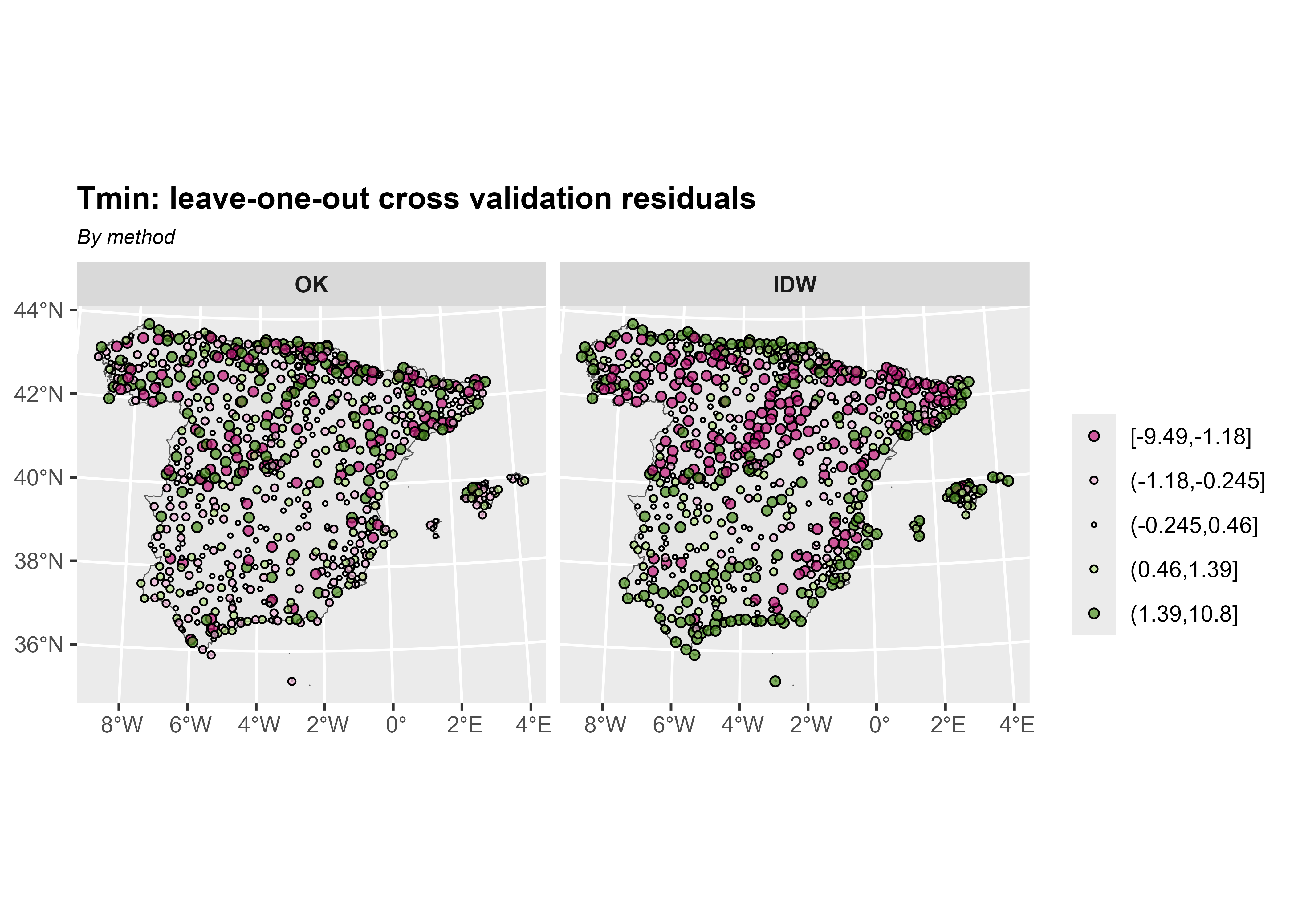
Diagnostic statistics help select the best interpolation method. The error-based measures used here are root-mean-square error (RMSE) and mean error (ME).
# Calculate OK diagnostic statistics.

me_ok <- me(xv_ok$observed, xv_ok$var1.pred)

rmse_ok <- rmse(xv_ok$observed, xv_ok$var1.pred)

# Calculate IDW diagnostic statistics.

me_idw <- me(xv_idw$observed, xv_idw$var1.pred)

rmse_idw <- rmse(xv_idw$observed, xv_idw$var1.pred)
As expected, OK yields better predictions than IDW.
| Diagnostic statistics | ME | RMSE |
|---|---|---|
| OK | -0.028 | 1.659 |
| IDW | -0.037 | 2.253 |
References
Cressie, Noel A. C. 1993. “Statistics for Spatial Data.” Chap. 1 in Statistics for Spatial Data, Rev. ed. Wiley Series in Probability and Statistics. John Wiley & Sons, Ltd. https://doi.org/10.1002/9781119115151.ch1.
Gräler, Benedikt, Edzer Pebesma, and Gerard Heuvelink. 2016. “Spatio-Temporal Interpolation Using Gstat.” The R Journal 8: 204–18. https://journal.r-project.org/archive/2016/RJ-2016-014/index.html.
Hijmans, Robert J., and Aniruddha Ghosh. 2023. “Interpolation.” Chap. 4 in Spatial Data Analysis with R. Spatial Data Science with R and "terra". Online. https://rspatial.org/analysis/analysis.pdf.
Montero, José-Marı́a, Gema Fernández-Avilés, and Jorge Mateu. 2015. Spatial and Spatio-Temporal Geostatistical Modeling and Kriging. Wiley Series in Probability and Statistics. Wiley. https://doi.org/10.1002/9781118762387.
Pebesma, Edzer J. 2004. “Multivariable Geostatistics in S: The gstat Package.” Computers & Geosciences 30: 683–91. https://doi.org/10.1016/j.cageo.2004.03.012.
Pizarro, Manuel, Diego Hernangómez, and Gema Fernández-Avilés. 2021. climaemet: Climate AEMET Tools. Zenodo. https://doi.org/10.5281/ZENODO.5512237.
Ribeiro Jr, Paulo Justiniano, and Peter Diggle. 2001. geoR: Analysis of Geostatistical Data. The R Foundation. https://doi.org/10.32614/cran.package.geor.
Tobler, Waldo R. 1969. “Geographical Filters and Their Inverses.” Geographical Analysis 1 (3): 234–53. https://doi.org/10.1111/j.1538-4632.1969.tb00621.x.
Wackernagel, Hans. 1995. “Ordinary Kriging.” Chap. 11 in Multivariate Geostatistics: An Introduction with Applications. Springer Berlin Heidelberg. https://doi.org/10.1007/978-3-662-03098-1_11.
Citation
BibTeX citation:
@online{fernández-avilés2026,
  author = {Fernández-Avilés, Gema and Hernangómez, Diego},
  title = {Dealing with Spatial Data},
  date = {2026-06-12},
  url = {https://dieghernan-dealing-with-spatial-data.share.connect.posit.cloud/},
  langid = {en},
  abstract = {This article introduces exploratory spatial data analysis
    (ESDA) in R through a practical geostatistical case study. Using
    minimum temperature observations recorded by the Spanish
    Meteorological Agency (AEMET) during Storm Filomena on 8 January
    2021, it presents the main concepts and workflows required for
    geostatistical analysis. Topics include spatial data structures,
    coordinate reference systems, exploratory spatial analysis,
    semivariogram modelling, ordinary kriging, inverse distance
    weighting, and cross-validation. The examples rely on the modern R
    spatial ecosystem, including sf, terra, gstat, geoR, climaemet,
    mapSpain and tidyterra.}
}
For attribution, please cite this work as:
Fernández-Avilés, Gema, and Diego Hernangómez. 2026. “Dealing with
Spatial Data.” June 12. https://dieghernan-dealing-with-spatial-data.share.connect.posit.cloud/.